Managing servers across on-premises, Azure, and other clouds can feel like juggling — you never quite know what changed, where, or when.
That’s exactly the challenge Azure Arc–enabled servers were built to solve — and one of the most underrated features they bring is Inventory and Change Tracking.
🔍 Why change tracking matters
Every environment changes constantly — patches get installed, services restart, software is updated.
Some of those changes are planned, but others… not so much.
With Change Tracking and Inventory, you get a clear view of:
- What software is installed
- Which patches have been added or removed
- When something changed — and on which machine
It’s like a timeline for your infrastructure. You can quickly answer questions like:
“When did that update get installed?”
“Why did this service suddenly stop working?”
💡 A Quick Example
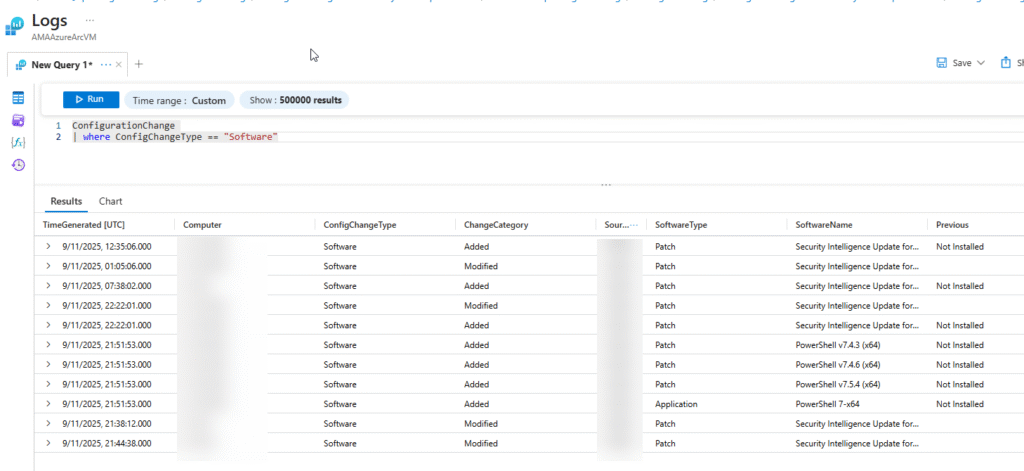
Here’s a simple KQL query you can run in Log Analytics:
ConfigurationChange
| where ConfigChangeType == "Software"
With just that, you’ll see a full list of software updates, installations, and removals across your Azure Arc–connected servers.
In my own setup, it instantly showed all the latest patches and even a few PowerShell version changes — a small but powerful way to keep visibility across hybrid systems.
🧰 How to get started
1️⃣ Connect your servers to Azure Arc.
2️⃣ Enable Change Tracking and Inventory in Azure Automation or with a built-in policy.
3️⃣ Link it to a Log Analytics workspace (choose wisely!).
4️⃣ Run your first queries — and start seeing your environment clearly.
That’s it. From there, Azure takes care of collecting and organizing all the data for you. You can see on which server this feature is enabled as which DCR & Workspace is connected.

🚀 Why should I use it?
The combination of Azure Arc and Change Tracking gives you something every IT team needs: visibility and time tracking of that visibility.
It’s one of those “quietly powerful” features that doesn’t get enough attention, but once you start using it, you’ll wonder how you managed without it.